Multi-modal AI video generation is revolutionizing how creators produce content—and if you’re still using text-only prompts, you’re already behind.
You know that feeling. You spend 20 minutes crafting the perfect prompt, hit generate, and… your character has brown eyes in the first frame and blue eyes three seconds later. Their shirt changed. The background morphed. What should be a cinematic moment looks like a glitchy fever dream.
I’ve been there. We’ve all been there.
For the past two years, AI video generation has been a frustrating slot machine. You pull the lever, cross your fingers, and hope the algorithm gods bless you with something usable. Most of the time? You get garbage.
But something changed in early 2026. And if you’re still using text-only prompts to generate video, you’re doing it wrong.
What Is Multi-Modal AI Video Generation?
Multi-modal AI video generation is a technology that creates video content by processing and synthesizing multiple types of input simultaneously — text, images, reference videos, and audio — rather than relying on text prompts alone.
The newest AI video generation systems don’t just read text. They see images. They watch videos. They listen to audio. And they combine all of it into coherent, controllable output.
Here’s what you can now feed into video AI tools like Seedance 2.0, LTX-2, and the latest generation of multi-modal video AI:
- Reference images (up to 9 at once) — Your character, your product, your visual style
- Reference videos (up to 3 clips) — The exact choreography, camera movement, or action you want
- Audio tracks — Music, voice-over, or sound effects that the video will actually sync to
- Text prompts — Your description of what should happen
The multi-modal AI video generator doesn’t treat these separately. It synthesizes them together. When you upload a photo of your character, a clip of martial arts choreography, and a dramatic music track, you get a scene where your character performs those exact moves in time with the music.
Key Definitions for AI Video Generation
Reference Image: A static image uploaded to an AI video generator to establish visual consistency. The multi-modal AI uses this as an anchor to maintain character appearance, clothing, or product details throughout the video.
Reference Video: An existing video clip provided as input to teach the AI specific movement patterns, camera techniques, or choreography. The AI video generation system analyzes motion, timing, and flow to replicate these elements.
Character Consistency: The ability of multi-modal AI video generation to maintain the same visual appearance of subjects across all frames of a video — same face, clothing, build, and distinguishing features.
Keyframe Generation: A video creation technique where AI animates between a starting frame and ending frame provided by the user, giving precise control over the beginning and end of scenes.
NVFP4/NVFP8: NVIDIA’s reduced-precision number formats that allow AI models to run faster while using less video memory, enabling 4K video generation on consumer RTX GPUs.
Cloud vs Local AI Video Generation: Cloud-based generation runs on remote servers (requires internet, may have queues), while local generation runs on your own GPU (private, no queues, requires powerful hardware).
Why Multi-Modal AI Video Generation Matters in 2026
Let’s talk about the three problems that made early AI video generation nearly useless:
Problem 1: The Shapeshifter Character (AI Video Consistency Issues)
Old AI video had consistency issues so bad it was almost funny. Generate a woman walking down a street and by frame 30 she’s a different person wearing different clothes. Great for horror movies, useless for everything else.
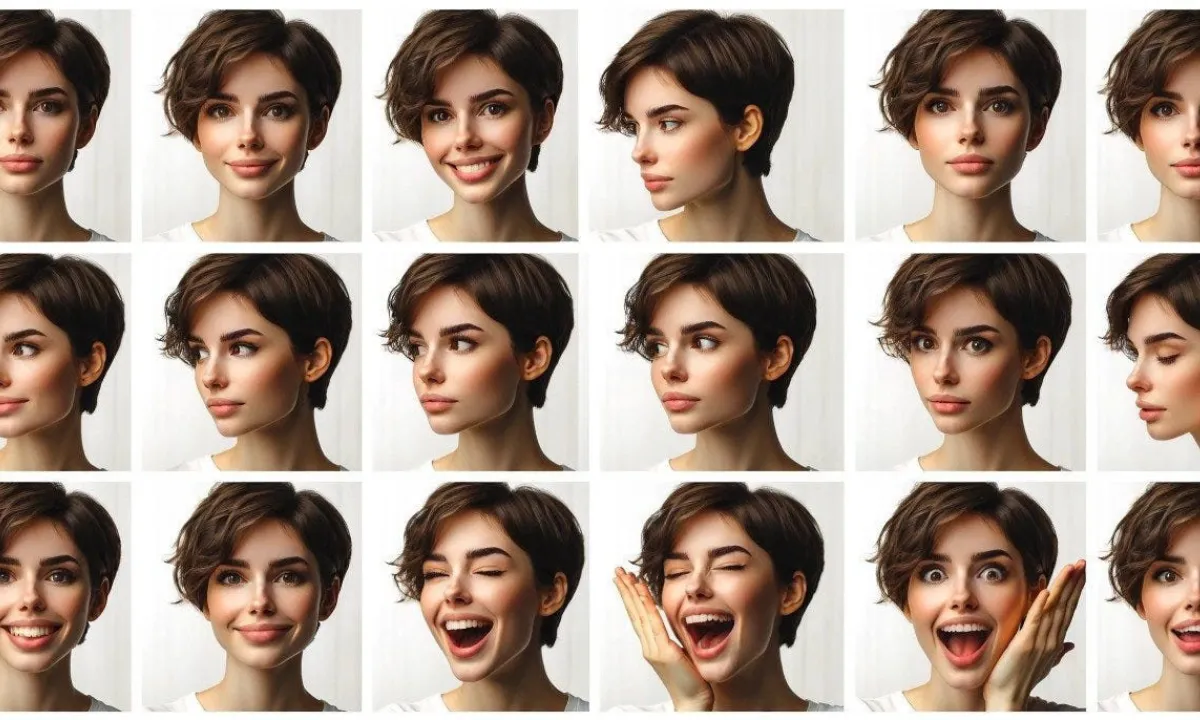
Multi-modal AI video generation fixes this with reference images. Upload one clear photo of your character. The AI locks onto their facial features, clothing, build, and distinguishing characteristics. They stay consistent from start to finish because the AI video generator has an anchor point.
Problem 2: The Drunk Choreography (AI Movement Control)
Want a specific movement sequence? With text-only prompts, you had to describe every micro-movement in painful detail. And even then, the AI would interpret “graceful dance” as “flailing limbs.”
Now you upload a reference video showing exactly the movement you want. The multi-modal AI learns the pattern, the timing, the flow — and replicates it precisely. A filmmaker can reference a 3-second clip from a professional film and teach the AI video generation system that exact camera technique.
Problem 3: The Silent Movie Syndrome (AI Audio Sync)
Videos that ignore audio feel dead. A perfectly rendered scene with no connection to the music underneath looks like a tech demo, not art.
Multi-modal AI video generation systems accept audio input and generate video that synchronizes to it. Music hits land with visual impacts. Voice-overs drive scene transitions. The pacing feels intentional because it is.
Who Benefits From Multi-Modal Video AI?
Solo Creators and YouTubers
You’re no longer limited by your filming equipment, editing skills, or budget. Your creative vision — not your technical limitations — becomes the constraint. A single creator can now produce content that looks professionally shot using multi-modal AI video tools.
E-commerce and Product Marketing
Generate unlimited product demonstration videos from one product photo. Show your item from different angles, in different scenarios, with different models — all maintaining perfect consistency. One reference image becomes dozens of video variations through AI video generation.
Marketing Teams and Agencies
Test multiple creative approaches in hours instead of weeks. Create localized versions for different markets without re-shooting. The cost and time required for video content just dropped by 90% with multi-modal AI video generation.
Indie Filmmakers and Content Studios
Produce cinematic footage that rivals multi-million dollar productions. Use reference clips to generate additional angles without the original talent. The playing field just got leveled by video AI technology.
NVIDIA LTX-2: Local Multi-Modal AI Video Generation Is Here
Here’s what makes this moment different from every other “AI breakthrough” announcement.
At CES 2026 (just last month), NVIDIA unveiled the LTX-2 pipeline with Lightricks. This isn’t cloud-only. This multi-modal AI video generator runs on your RTX GPU.
- 3x faster performance than previous AI video generation methods
- 60% less VRAM usage with NVFP4 format
- 4K video generation on consumer hardware generating up to 20 seconds per clip
- Complete pipeline: 3D scene → photorealistic keyframes → 4K output
The Interactive Advertising Bureau reports that 86% of advertising buyers currently use or plan to implement generative AI for video ad creation. In e-commerce, AI-generated product videos have been shown to boost conversion rates by 20% based on 2023 Shopify data.
You don’t need a $500/month subscription to some API. You don’t need to wait in cloud queues. You generate multi-modal AI video on your own machine, privately, with full control.
How to Use Multi-Modal Video AI: Practical Workflow
Want to try multi-modal AI video generation? Here’s the workflow that works:
Step 1: Gather Your References for AI Video
- One clear image of your subject (character, product, whatever)
- A short video clip showing the movement or camera work you want
- Your audio track (music, voice-over, or both)
Step 2: Write a Focused Prompt for Video AI
Describe the scene, the mood, and any specific details not covered by your references. Keep it under 100 words. The references do the heavy lifting now in multi-modal AI video generation.
Step 3: Generate and Iterate Your AI Video
First attempts might need tweaking. Adjust your reference images or prompt. But you’re tweaking, not starting from scratch each time with this video AI technology.
Step 4: Extend and Refine Multi-Modal Video
Many AI video generation tools now let you upload your generated video and extend it by 5-10 seconds. Build longer sequences piece by piece while maintaining consistency.
Frequently Asked Questions About Multi-Modal AI Video Generation
What is multi-modal AI video generation?
Multi-modal AI video generation is a technology that creates videos by processing multiple input types simultaneously—text prompts, reference images, reference videos, and audio tracks—to produce consistent, controllable output. Unlike earlier text-only systems, multi-modal AI video generators can maintain character consistency, replicate specific movements, and synchronize with audio for professional results. The market is projected to grow from $32.04 billion in 2025 to $133.34 billion by 2030.
How does multi-modal AI video generation fix character consistency issues?
Multi-modal AI video generation fixes character consistency by using reference images as anchor points. When you upload a clear photo of your character, the AI video generator locks onto their facial features, clothing, build, and distinguishing characteristics. This ensures the character maintains the same appearance throughout the entire video, eliminating the “shapeshifting” problem of earlier AI video tools.
What hardware do I need for local AI video generation?
For NVIDIA’s LTX-2 local video generation pipeline, you need an RTX GPU (RTX 30 series or newer recommended). The NVFP4 format reduces VRAM usage by 60%, making 4K multi-modal AI video generation possible on consumer hardware with up to 20-second output clips. Cloud-based alternatives like Seedance 2.0 work on any device with a web browser.
Can multi-modal AI video generation sync with music and audio?
Yes, multi-modal AI video generators accept audio inputs including music, voice-overs, and sound effects. The AI video generation system analyzes the audio’s rhythm, emotional beats, and timing to generate video that synchronizes with it — music hits land with visual impacts, voice-overs drive transitions, and pacing feels intentional.
What are the best multi-modal AI video generation tools in 2026?
The leading multi-modal AI video generation tools in 2026 include Seedance 2.0 (up to 9 images, 3 videos, 3 audio inputs), LTX-2 by Lightricks (4K local generation with keyframe control), HeyGen (AI avatars with lip-sync), Synthesia (corporate training videos), Kling AI (general purpose high-quality generation), and Runway Gen-3 (creative professional tools).
Is multi-modal AI video generation free?
Most multi-modal AI video generation tools offer limited free tiers with watermarks or generation limits. Paid plans typically range from $20-100/month for cloud-based tools. Local generation with LTX-2 is free after the initial hardware investment (RTX GPU), with no subscription or per-generation fees for this video AI technology.
How long can multi-modal AI videos be?
Current multi-modal AI video generators typically create 5-10 second clips per generation. However, many video AI tools now allow extending existing videos by uploading them as references and generating additional seconds. This enables building longer sequences piece by piece while maintaining consistency.
What makes LTX-2 different from cloud-based AI video generation tools?
LTX-2 runs locally on your RTX GPU rather than on cloud servers. This means no subscription fees, no generation queues, complete privacy (your content never leaves your machine), and full control over the multi-modal AI video generation workflow. It generates 4K video with keyframe control using significantly less VRAM than previous methods.
What’s the difference between Seedance 2.0 and LTX-2 for AI video?
Seedance 2.0 is a cloud-based multi-modal AI video generator that accepts up to 9 reference images, 3 reference videos, and 3 audio inputs simultaneously. LTX-2 is a local AI video generation pipeline that runs on your own hardware, offering 4K output and keyframe control without subscription costs. Seedance is better for accessibility; LTX-2 is better for privacy and cost at scale.
The Bottom Line on Multi-Modal AI Video
We’ve crossed a threshold in February 2026. AI video generation went from “interesting toy with frustrating limitations” to “genuinely useful production tool.”
The difference is control. Multi-modal inputs give you control over consistency, movement, and pacing in video AI. You’re not hoping the AI randomly generates something good. You’re directing it to create exactly what you want.
For creators who’ve been waiting for AI video generation to actually work — it’s here. Stop wrestling with text-only prompts. Start directing with images, video, and audio using multi-modal AI video generation.