Creating compelling visual stories has always required one thing above all else: consistent characters. Whether you’re crafting a comic book, developing a brand mascot, or producing a visual novel, your audience needs to recognize your characters instantly—across every scene, angle, and emotion.
Until recently, this was AI image generation’s biggest weakness. You’d generate the perfect character, only to have them look completely different in the next image. But 2026 has changed everything. Character consistency has evolved from a frustrating limitation into a powerful creative tool, and creators who master it are unlocking entirely new storytelling possibilities.
In this guide, we’ll explore the breakthrough technologies making consistent AI characters possible, compare the leading tools, and provide actionable workflows you can implement today.
What Is AI Character Consistency and Why Does It Matter?
AI character consistency refers to the ability to generate the same character across multiple images while maintaining recognizable facial features, body proportions, clothing, and overall appearance. It’s the difference between creating random portraits and building a coherent visual narrative.
Why Consistency Is Non-Negotiable
Storytelling coherence sits at the heart of every successful visual project. When readers follow a character through a comic or visual novel, inconsistency breaks immersion. A protagonist whose face changes between panels creates confusion rather than connection.
Brand recognition demands consistency even more strictly. A company mascot that looks different across marketing materials fails to build the visual equity brands depend on. Think of Mickey Mouse or the Geico gecko—their consistency IS their brand power.
Professional credibility separates hobby projects from commercial work. Clients paying for AI-assisted content expect the same quality standards as traditional illustration. Inconsistent characters signal amateur production.
AI video readiness makes consistency essential for the future. As AI video generation matures, having established consistent characters becomes the prerequisite for creating animated sequences featuring recognizable protagonists.
The Character Consistency Challenge: Why Most AI Tools Fail
Understanding why consistency is difficult helps explain why recent breakthroughs matter so much.
The Randomization Problem
Most AI image generators are designed for variety. When you prompt “young woman with brown hair,” the model interprets this description differently each time—varying face shape, hair style, eye color, and countless subtle features. This randomization is actually a feature for general image generation, ensuring diverse outputs.
The Technical Barrier
Maintaining consistency requires the AI to:
- Lock specific facial structure across generations
- Preserve unique identifiers (scars, birthmarks, specific hairstyles)
- Maintain body proportions and clothing details
- Adapt the character to new poses, lighting, and environments while keeping core identity
Early attempts at solving this relied on complex prompt engineering—describing characters with exhaustive detail every time. But even the most detailed prompts couldn’t guarantee consistency because the model still introduced random variations.
The Workflow Friction
Before dedicated consistency features, creators developed complicated workbooks: base images, reference sheets, negative prompts, seed locking, and iterative refinement cycles. What should take minutes consumed hours.
Leonardo.AI’s Digital DNA: A Game-Changer for Storytellers
Leonardo.AI has emerged as the leader in character consistency through its innovative Digital DNA system—arguably the most sophisticated character locking technology available to creators in 2026.
How Digital DNA Works
Digital DNA functions as a persistent character profile that the AI references for every generation. Instead of describing your character anew each time, you create a DNA profile once, and Leonardo.AI maintains those features across unlimited generations.
The system captures:
- Facial architecture: Bone structure, proportions, distinctive features
- Physical attributes: Height, build, posture patterns
- Clothing signatures: Style preferences, colors, accessories
- Expression baseline: How the character’s face moves during emotion changes
Creating Your First Digital DNA Character
Step 1: Generate or Upload a Base Character Start with a high-quality image of your character. You can generate this using Leonardo.AI’s standard tools or upload existing artwork/photos.
Step 2: Activate Digital DNA In the Leonardo.AI interface, select “Create Character” and choose your base image. The system analyzes the visual elements and creates a persistent profile.
Step 3: Define Character Parameters Specify which features must remain consistent (facial structure, hair color) versus which can vary (clothing, background, pose). This gives you controlled flexibility.
Step 4: Generate Variations With Digital DNA active, prompt for new scenes: “character_name standing in a coffee shop, morning light” or “character_name smiling, close-up portrait.” The AI maintains identity while adapting context.
Digital DNA Advanced Workflows
Multi-Character Scenes: Create separate DNA profiles for each character, then prompt interactions: “character_A talking to character_B in a park.”
Age Progression: Adjust age parameters while maintaining core identity: “character_name as a teenager” or “character_name elderly, gray hair.”
Costume Variations: Lock facial features while changing outfits: “character_name in formal attire” versus “character_name in workout clothes.”
Leonardo.AI Limitations
Digital DNA requires a subscription for full functionality, and extremely complex characters (fantasy creatures with intricate details) may need occasional manual refinement. Additionally, dramatic angle changes (extreme foreshortening, unusual perspectives) can challenge the system.
FLUX.1.1 Pro: Speed Meets Consistency
While Leonardo.AI excels at character locking, FLUX.1.1 Pro dominates in raw generation quality and speed—delivering near-photorealistic consistent characters in just 4.5 seconds.
The FLUX.1.1 Pro Advantage
Speed without sacrifice: 4.5-second generation means rapid iteration. Test poses, expressions, and scenes quickly without waiting minutes between outputs.
Photorealistic fidelity: FLUX.1.1 Pro produces images nearly indistinguishable from photographs, making it ideal for realistic character projects, marketing materials, and concept photography.
Advanced prompting: The model understands complex scene descriptions and maintains character positioning, lighting consistency, and environmental interaction.
FLUX.1.1 Pro Consistency Workflows
Unlike Leonardo’s Digital DNA, FLUX relies on image reference guidance—uploading a base character image to guide generations.
Reference-Guided Generation:
- Upload your character reference image
- Enable “Image Reference” in the interface
- Adjust reference strength (higher = stricter consistency)
- Prompt for new scenarios with the reference active
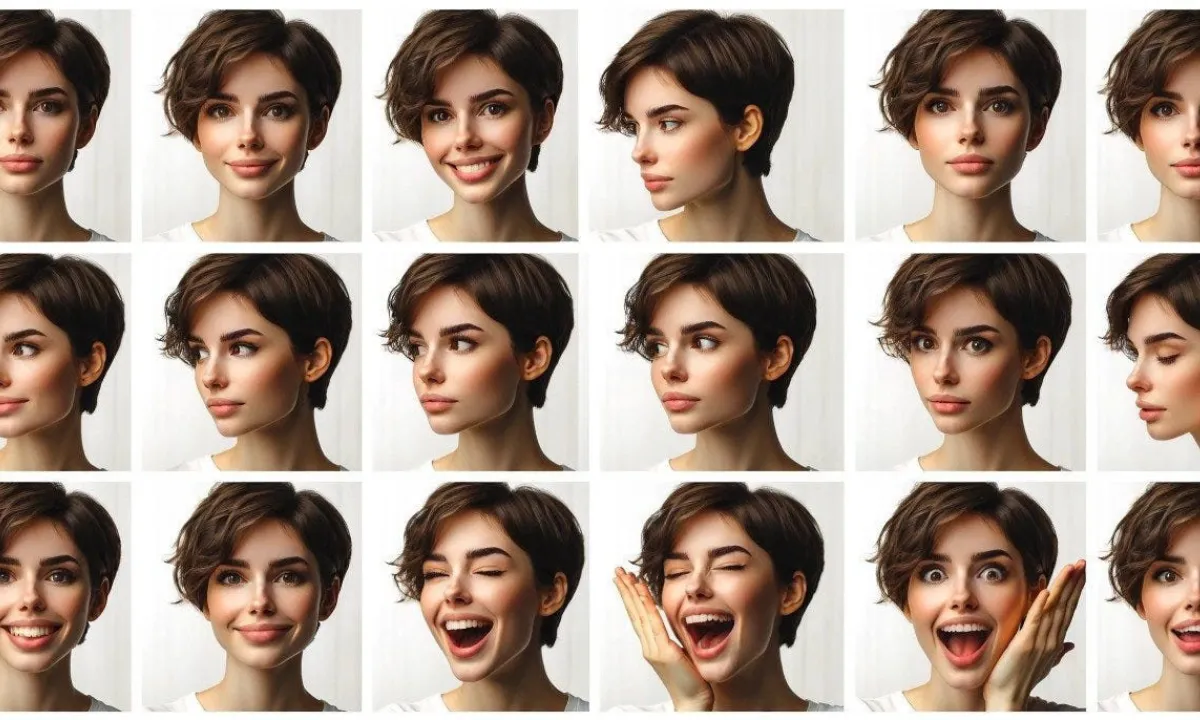
Character Sheet Method: For complex projects, generate a character sheet first—multiple angles and expressions of your character in one image. Use this as a comprehensive reference for subsequent generations.
When to Choose FLUX.1.1 Pro
FLUX excels when:
- You need photorealistic output
- Speed is essential for your workflow
- Projects involve complex environmental integration
- You’re working with existing reference photography
FLUX requires more manual reference management compared to Leonardo’s persistent DNA system.
Other Notable Tools for Character Consistency
Getimg.ai
Getimg.ai offers robust image reference capabilities with an emphasis on workflow integration. The platform excels at style transfer while maintaining character features—useful for creating consistent characters across different artistic styles.
Midjourney Character Reference
Midjourney’s character reference system (activated with--crefparameter) allows users to reference character images in prompts. While powerful, it requires more technical prompting knowledge than Leonardo’s guided interface.
Stable Diffusion with Custom LoRAs
For technically proficient creators, training custom LoRA (Low-Rank Adaptation) models on Stable Diffusion provides ultimate control. This approach requires significant setup but offers unlimited customization.
Step-by-Step: Creating Your First Consistent Character
Let’s walk through a complete workflow using Leonardo.AI Digital DNA, the most accessible professional solution.
Step 1: Character Concept Development
Before generating, define your character:
- Core identity: Age, gender, ethnicity, build
- Distinguishing features: Unique scars, hairstyles, accessories
- Personality indicators: Expression tendencies, posture, clothing style
- Color palette: Dominant colors for easy visual recognition
Write a concise character description: “Maya Chen, 28, East Asian, athletic build, shoulder-length black hair with silver streak, scar above left eyebrow, prefers practical clothing in earth tones, confident posture, direct eye contact.”
Step 2: Generate Base Character Image
In Leonardo.AI:
- Select “Image Generation”
- Enter your character description as the prompt
- Choose “PhotoReal” or appropriate model for your style
- Generate 4-8 variations
- Select the best result—prioritize clear facial features and good lighting
Step 3: Create Digital DNA Profile
- Navigate to “Character” section
- Click “Create Character”
- Upload your selected base image
- Name your character (“Maya Chen”)
- Review the auto-detected features
- Adjust consistency parameters as needed
- Save the DNA profile
Step 4: Generate Scene Variations
With your DNA profile active:
- “Maya Chen working at a laptop, coffee shop background, morning light”
- “Maya Chen looking concerned, rainy street, cinematic lighting”
- “Maya Chen celebrating, confetti falling, bright colors”
- “Maya Chen in profile view, sunset background, silhouette”
Each generation maintains Maya’s core features while adapting to the new context.
Step 5: Build Your Asset Library
Create a folder system:
Character_Base/– Original DNA reference and character sheetExpressions/– Happy, sad, angry, surprised variationsEnvironments/– Different setting contextsActions/– Character performing various activitiesAngles/– Profile, three-quarter, rear views
Advanced Techniques: Multi-Angle, Multi-Expression Workflows
Creating Character Sheets
Character sheets display your character from multiple angles and with various expressions in a single reference image. Generate these by prompting:
“Character sheet, multiple poses and expressions, front view, side view, three-quarter view, smiling, neutral, serious, surprised, consistent character throughout, labeled sections”
Use character sheets as master references for projects requiring extensive character usage.
Expression Libraries
Build a comprehensive expression set:
- Generate base character with neutral expression
- Use inpainting or reference-guided generation to modify facial features
- Create 12-16 core expressions covering emotional range
- Organize by intensity (subtle smile → broad grin)
Costume and Prop Variations
Maintain character identity while varying wardrobe:
- Generate base character
- Use masking/inpainting to change clothing areas
- Or prompt: “[Character name] wearing [specific outfit], maintaining all facial features and body proportions”
Real-World Applications: Comics, Marketing, and Video Pre-viz
Comic Book Production
Independent comic creators use AI character consistency to:
- Generate character lineups and reference sheets
- Create background extras that maintain visual style
- Produce panel roughs for traditional refinement
- Develop color studies and lighting references
Workflow: Establish main character DNA profiles → Generate scene thumbnails → Select and refine key panels → Traditional inking/coloring over AI base
Brand Mascot Development
Marketing teams leverage consistency for:
- Consistent mascot appearance across campaigns
- Seasonal variations (holiday outfits, themed accessories)
- Multi-platform adaptation (social avatars, billboard graphics, merchandise)
- A/B testing visual approaches while maintaining recognition
Video Pre-Visualization
Film and animation professionals use consistent AI characters for:
- Storyboard generation with recognizable characters
- Pitch materials showing character consistency
- Shot planning and composition studies
- Client presentations demonstrating visual direction
Common Pitfalls and How to Avoid Them
Over-Reliance on Automation
Pitfall: Expecting perfect consistency without any manual review. Solution: Always review generated images for identity drift. Small variations compound across large projects.
Ignoring Lighting and Environmental Impact
Pitfall: Generating characters in dramatically different lighting without accounting for how light affects appearance. Solution: Understand that strong directional light, heavy shadows, or extreme color casts will alter how features appear. This is realistic but may require consistency adjustments.
Inconsistent Style Across Project
Pitfall: Mixing different AI models or settings mid-project, causing visual inconsistency even with character consistency. Solution: Lock your model, settings, and generation parameters at project start. Document your workflow for team consistency.
Neglecting Character Evolution
Pitfall: Keeping characters absolutely static when the narrative requires growth or change. Solution: Plan character evolution points. Create DNA variations for different story phases (battle-worn, aged, transformed).
The Future: From Static Images to AI Video with Consistent Characters
The technologies enabling character consistency in images are rapidly extending into video. Several developments are converging:
Character-to-Video Pipelines
Tools are emerging that accept consistent character references and generate short video clips maintaining that identity. This bridges the gap between AI image and video generation.
Motion Consistency
Beyond visual appearance, AI systems are developing motion signatures—distinctive ways characters move that enhance recognition. This includes gait patterns, gesture tendencies, and posture habits.
Real-Time Character Animation
Interactive applications (games, virtual assistants, educational tools) increasingly use consistent AI characters that respond in real-time while maintaining visual identity.
The Democratization of Animation
Character consistency technology is making animation accessible to creators without traditional art training. A storyteller with compelling ideas can now create visual narratives that previously required studio budgets.
Conclusion: Mastering Character Consistency in Your Workflow
AI character consistency has transformed from an experimental feature into an essential creative tool. Whether you’re producing comics, developing brand assets, or preparing for AI video production, mastering these technologies gives you significant advantages.
Key Takeaways:
- Leonardo.AI’s Digital DNA offers the most streamlined persistent character system
- FLUX.1.1 Pro provides unmatched speed and photorealistic quality with reference guidance
- Successful implementation requires both technical knowledge and artistic judgment
- Character consistency is foundational for the coming wave of AI video tools
Start with a single character. Build your DNA profile or reference library, generate a small scene set, and experience the difference consistency makes. The creators who master this technology today will lead visual storytelling tomorrow.
Ready to create your first consistent character? Open Leonardo.AI or your preferred tool, define your character concept, and begin building your digital DNA. The future of AI-assisted storytelling starts with characters your audience will recognize and remember.